Minew MBM01 0043
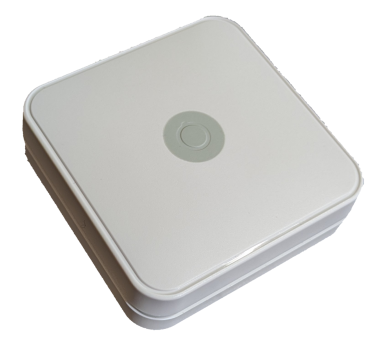
Description
Minew MBM01 0043 is a battery-powered extender. Extenders are used to extend the range and number of node connections in a network. The device is powered by 4 replaceable Lithium batteries (ER14505/AA size, one set installed/included). Depending on configuration and usage, typically between 1 and 5 years battery life can be expected.
This hardware is sourced from Minew. See Minew MBM01 for hardware details.
The Bluetooth chipset is nRF52840 from Nordic Semiconductor.
Firmware Model Number: 0x0043
Downlinks: Up to 18
DFU Type: BLE SMP
Normal Operation Procedure
Similar to all Meshtech extenders the Minew MBM01 0043 is delivered in storage mode. Normal operation device-mode for this device is connected. To increase shelf life and not advertise anything during transport, button press is needed to wake device. Pressing the button for 1s will make device discoverable by advertising BLE storage mode advertisements. Green LED will light to indicate storage mode advertisement started after the 1s button press. Device is now discoverable from nearby systems, generating storage mode events. Command to switch device mode must be sent within 5 minutes. Additional button presses in this state will make green LED blink 3 times and 5 minute timer is extended. If no command to switch device mode is received before timer elapse, device will go back to sleep and require new 1s button press to wake. While device is in connected mode, pressing button will result in LED blinking 3 times. Color of LED blink is depending on connection status. If device has successfully joined a network blue LED will blink, if no connection is established red LED will blink.
Wireless range will depend on many factors and are reduced by obstacles and other devices’ wireless interference. Typically around 15m between extenders in an indoor environment - further is possible if line of sight/outdoor/minimal interference, shorter might be required to get trough thick walls/interference.
For best performance it is recommended to follow these rough guidelines when deploying extenders:
Start near a gateway.
Line of sight or minimal number of obstacles between extenders where possible.
Two or more possible uplink devices towards gateway.
Avoid mounting so antenna is touching metal.
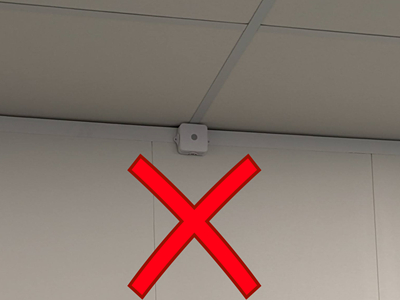
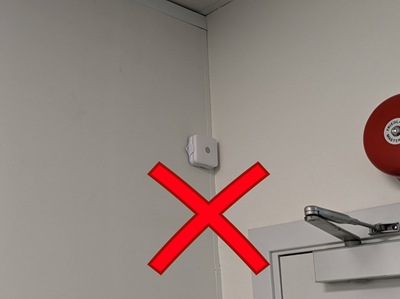
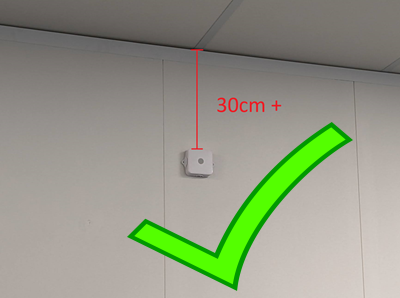
Mount above person height if on wall. Avoid mounting closer than 30cm from ceiling and corner/walls. If mounting on ceiling, avoid mounting closer than 30cm from walls.
Service Mode
Service Mode can be used to perform DFU upgrades and/or factory reset of a device when provisioning information (i.e. network key) is unknown/lost. To enter Service Mode, button need to be pressed while powering on device - then released within 5 seconds. Note that all 4 batteries need to be removed to power off device, and button need to be pressed while first battery is inserted to enter Service Mode. Device being in Service Mode is indicated by blue LED blinking rapidly. Device is discoverable by “SM0043-{firmware_version}” device name while in Service Mode. It runs BLE SMP and can be connected to and upgraded. To perform factory reset, press button continuously for more than 5 seconds while device is in Service Mode. Blue LED will light constant while button is held, and should be held until blue LED turn off (5s) to perform factory reset. If no connection is established or no factory reset command is received, device will reboot and start in previous mode after 2 minute timeout. Timeout is extended while BLE connection is established and for additional 2 minutes after disconnect.
Battery Life
Battery life depends on several factors including, but not limited to:
Time the extender performs scanning
Number of children connected (central connections)
Amount of traffic
Number of reconnects
Ambient temperature
In Connected Mode with default scan (24%), battery life is up to 1 year. This is the setting recommended when having devices operating in unconnected mode.
Scanning is the factor that impacts battery life the most. In setups where all devices can operate in Connected Mode, Power Saving network mode can be used to greatly increase battery life. See Network Mode for details.
The table below provides some estimates on battery life for some typical conditions/scenarios with low traffic. Scanning 0-5min/hour is typical for Power Saving mode setups, while 60min/hour is equivalent to not having Power Saving active:
Scanning (min/hour) |
Children |
Battery Life (years maximum) |
|---|---|---|
0 |
3 |
13 |
0 |
10 |
5 |
0 |
18 |
3 |
5 |
3 |
6.4 |
5 |
10 |
3.6 |
5 |
18 |
2.4 |
60 |
3 |
1 |
60 |
10 |
0.9 |
60 |
18 |
0.8 |
5 min/hour would mean that one device disconnect and is unable to reconnect every hour with network in Power Saving mode. This would be be a quite pessimistic scenario in most installations. If connections are that bad, try to improve the network coverage by moving extenders/sensors or add more extenders.
Note
The scan-window setting will affect battery life and throughput. We highly recommend keeping scan-window at it’s default value.
The chemistry in the lithium batteries used in Minew MBM01 makes it difficult to accurately predict remaining capacity without adding additional components consuming energy and increasing cost. Instead of reporting some highly inaccurate value in 0x8100 - Battery Level, the device will report 100 to indicate that voltage is “OK” for most of its operation. Battery Level will then jump to a value < 15 once it knows with high certainty that battery is nearing depletion.
Battery Level has this relation to voltage measured:
VDD mV |
battery-level |
|---|---|
>3300 |
100 |
3200-3299 |
15 |
3100-3199 |
14 |
3000-3099 |
13 |
2900-2999 |
12 |
2800-2899 |
11 |
2700-2799 |
10 |
2600-2699 |
9 |
2500-2599 |
8 |
2400-2499 |
7 |
2300-2399 |
6 |
2200-2299 |
5 |
2100-2199 |
4 |
2000-2099 |
3 |
1900-1999 |
2 |
1800-1899 |
1 |
<1799 |
0 |
In Scan Network Mode and default settings, it is expected that device will be completely depleted and stop working within one month after first < 15% Battery Level reported.
Device Modes
Connected
Storage
Properties
Property |
Reported |
Default Value |
From Version |
|---|---|---|---|
Yes |
- |
||
Yes |
- |
||
Yes |
- |
||
No |
- |
||
No |
- |
||
Yes |
- |
||
No |
- |
||
No |
- |
2.0.0 |
|
Yes |
0x0000000000 |
2.0.0 |
|
No |
- |
2.0.0 |
|
No |
- |
2.0.0 |
|
Yes |
0x02 |
||
Yes |
- |
||
No |
- |
||
No |
- |
2.3.0 |
|
No |
- |
2.0.0 |
|
Yes |
0x03 |
||
Yes |
- |
||
- |
- |
||
- |
- |
||
No |
NULL |
2.2.0 |
|
No |
0x0000 |
||
No |
0x00000000 |
1.2.0 |
|
Yes |
0x00 |
||
Yes |
0x03000112 |
||
Yes |
0x00 |
2.1.0 |
|
No |
0x000000 |
||
- |
- |
||
- |
- |
||
- |
- |
||
- |
- |
||
No |
0x00000000 |
||
- |
- |
2.3.0 |
|
No |
0xFFFFFFFF |
2.3.0 |
|
- |
- |
||
- |
- |
||
Yes |
0x0000 |
||
Yes |
0x02 |
||
No |
NULL |
2.3.0 |
|
Yes |
0x0002 |
1.1.0 |
|
Yes |
0x18 (24 %) |
||
Yes |
0x00 |
||
Yes |
0x000000000000 |
||
- |
- |
2.3.0 |
|
- |
- |
2.3.0 |
|
Yes |
0xA6 (-90) |
||
Yes |
- |
||
Yes |
0x00000000 |
||
- |
- |
1.1.0 |
Measurements
Measurement |
From Version |
|---|---|
Events
Event |
From Version |
|---|---|
1.1.0 |
|
2.3.0 |