MT MeshConnect 2011
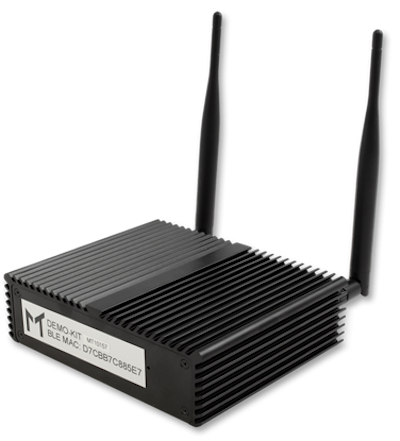
Deprecated product
This product is deprecated.
For new deployments we recommend using CTHINGS.CO Edge IoT Gateway XS 2032
Description
The MeshConnect 2011 is a gateway for the Meshtech BLE network. The Bluetooth chipset is nRF51822 from Nordic Semiconductor.
Configuration and monitoring of the gateway is available through the Meshtech Device Management Portal.
Firmware Model Number: 0x2011
Downlinks: Up to 7
Properties
Property |
Reported |
Default Value |
From Version |
|---|---|---|---|
Yes |
- |
||
Yes |
- |
||
Yes |
- |
||
No |
- |
||
Yes |
- |
||
Yes |
- |
9.2.0 |
|
Yes |
0x01 |
9.4.0 |
|
Yes |
- |
||
No |
- |
8.0.0 |
|
No |
- |
8.0.0 |
|
No |
[ ] |
8.0.0 |
|
No |
[ ] |
8.0.0 |
|
No |
- |
||
No |
- |
9.4.0 |
|
Yes |
0x02 |
||
- |
|||
Yes |
|||
- |
|||
- |
|||
- |
6.1.0 |
||
Yes |
6.1.0 |
||
- |
6.1.0 |
||
Yes |
|||
- |
- |
||
- |
- |
4.1.0 |
|
Yes |
0x3017 |
||
Yes |
0x00 |
||
Yes |
0x00 |
3.3.0 |
|
Yes |
0x01 (true) |
3.3.0 |
|
Yes |
0x01 (true) |
4.0.0 |
|
Yes |
0x01 (true) |
4.0.0 |
|
Yes |
0x00 |
6.3.0 |
|
No |
0x000000 |
4.5.0 |
|
Yes |
0x00 |
4.5.0 |
|
Yes |
0x00 |
6.1.0 |
|
Yes |
0x00 |
6.1.0 |
|
Yes |
0x00 |
6.1.0 |
|
- |
- |
||
- |
- |
7.0.0 |
|
- |
- |
||
- |
- |
5.1.0 |
|
No |
0x00000000 |
5.1.0 |
|
- |
- |
9.5.0 |
|
- |
- |
9.0.0 |
|
- |
- |
||
- |
- |
||
No |
- |
6.2.0 |
|
- |
3.2.0 |
||
No |
NULL |
8.0.0 |
|
- |
- |
9.5.0 |
|
No |
0x00000000 |
5.0.0 |
|
Yes |
0x2D (45 %) |
||
Yes |
0x00 (0) |
||
Yes |
0xA6 (-90) |
5.0.0 |
|
No |
NULL |
4.0.0 |
|
- |
- |
6.3.0 |
Note
Scan Window range is 5 - 95 %. It is highly recommended to not increase scan-window above 45 % (default). Increases beyond 45 % can negatively affect throughput.
Variants
Product Name |
Variant |
Description |
Notes |
|---|---|---|---|
Q100 2011-01 |
0x01 |
Q100 |
Deprecated |
MT MeshConnect 2011-02 |
0x02 |
Q150 |
|
MT MeshConnect 2011-03 |
0x03 |
Q150 (LTE) |
No longer supported from 9.0.0 |
MT MeshConnect 2011-04 |
0x04 |
Q150 (LTE, GPS) |
No longer supported from 9.0.0 |
BLE antenna
A long BLE antenna.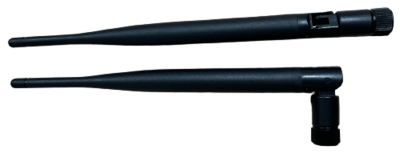
MT MeshConnect 2011-02
Variant 0x02 uses two long antennas - Bluetooth and NA (not applicable). RJ45 port, which is located closer to the USB ports, needs to be used for LAN/DHCP.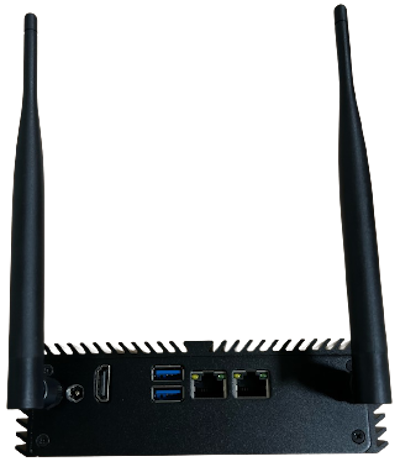
Static IP
For devices with Ethernet it is possible to set static IP address etc. for the ethernet interface using property 0x9130. Be careful when setting this, since you may not be able to reach the device if not set correctly.
We strongly recommend not changing this property. The device will use DHCP by default.
To disable static IP and use DHCP (default), write NULL (empty dictionary/array) to property 0x9130.
Note
The gateway will reboot after writing to 0x9130.
Root Certificates Management
Additional root certificates (in PEM format) can be added using 0x8030 - Add Root Certificate or
removed using 0x8031 - Remove Root Certificate.
The current set of additional root certificates can be read using 0x8032 - Root Certificates and
0x8033 - Root Certificate Fingerprints.
Root Certificates are needed for accessing HTTPS endpoints that present a certificate not signed by an official trusted certificate authority (CA).
History
Version |
Description |
|---|---|
9.2.0 |
0x8861 - Salto Endpoint (BETA) removed |
9.1.0 |
|
9.1.0 |
|
9.1.0 |
|
9.0.0 |
0x8308 - Try Ethernet removed |
9.0.0 |
0x8309 - Try LTE removed |
9.0.0 |
0x9108 - Network Interface removed |
9.0.0 |
0x9111 - ICCID removed |
9.0.0 |
|
5.0.0 |
Reporting of 0x8101 - Uptime was removed |
Release Notes
Licenses
Component |
License(s) |
|---|---|
MIT |
|
MIT |
|
Apache-2.0 |
|
MIT, Apache-2.0 |
|
MIT, GPLv2 |
|
MIT |
|
MIT |
|
MIT |
|
GPLv2 |