MT MultiTracker 11x
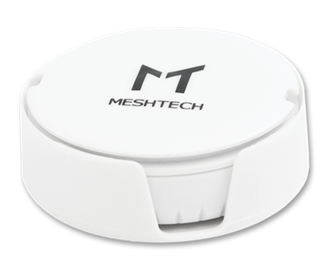
Description
The MT MultiTracker 11x is well suited for asset tracking, monitoring, and control as it collects a wide range of data-points. With its small size and lightweight, it is easy to deploy with a battery life-time up to 5 years on a single coin cell battery. The battery is of type CR2477 and is user replaceable.
The Bluetooth chipset is nRF52832 from Nordic Semiconductor.
- Firmware Model Number: 0x0005
- DFU Type: Nordic DFU (Secure)
- DFU Advertisement Name: DFU_ND:{MAC Address + 1}
Normal Operation Procedure
Similar to all Meshtech trackers the MT MultiTracker 11x is delivered in storage mode. This is to conserve power and avoid BLE advertising during transport. This device is normally operated in either connected or unconnected device-mode, depending on use case. While in storage mode, pressing button for 1s will make device discoverable by advertising BLE storage mode advertisements, and device can be switched to either connected or unconnected mode by command via system/gateway. Green LED will light to indicate storage mode advertisements has started. If no command to switch device mode is received while being in this state, device will light red LED and go back to sleep and stop advertisements after 5 minutes. If button is pressed again during the storage mode advertisement green LED will blink 3 times indicating that device is already advertising storage mode, and 5-minute timer is restarted.
Device Modes
- Connected
- Storage
- Unconnected
- DFU
Note
In DFU mode, the device MAC Address will increase with one. As an example, if MAC Address is AA:BB:CC:11:22:33, in DFU mode device will appear with MAC Address AA:BB:CC:11:22:34 and advertisement name "DFU_ND:AABBCC112234". Another example if MAC Address is AA:BB:CC:11:22:3F, in DFU mode device will appear with MAC Address AA:BB:CC:11:22:40 and advertisement name "DFU_ND:AABBCC112240"
Note
From version 28.0.0, this device supports extended route addresses. To establish a connection the network must support extended route addresses.
Properties
Measurements
| Measurement | From Version |
|---|---|
| 0x8800 - Temperature | |
| 0x8801 - Pressure | |
| 0x8802 - Humidity | |
| 0x8810 - Motion | 30.0.0 |
Motion is reported as timestamped data in secure mode and property in legacy mode.
Note
The measurements can also be read as properties. In this case, the latest sample is returned.
Events
| Event | Version |
|---|---|
| 0x8102 - Reset Cause | 26.5.0 |
| 0x9900 - Button 0 Counter | 30.0.0 |
Variants
| Variant | Pressure | Accelerometer | Temperature | Humidity | Magnetic |
|---|---|---|---|---|---|
| MT110 (1) | ✓ | ✓ | ✓ | ✓ | ✓ |
| MT111 (2) | ✓ | ✓ | ✓ | ✓ | |
| MT112 (3) | ✓ | ✓ | |||
| MT113 (4) | ✓ | ✓ | |||
| MT114 (5) | ✓ | ||||
| MT115 (6) | |||||
| MT116 (7) | ✓ | ✓ | ✓ |
Note
All MT MultiTracker Variants have Button, Red LED and Green LED sensors.
LEDs
The MultiTracker has two LEDs. LED ID is as follows:
| ID | Color |
|---|---|
| 0 | Red |
| 1 | Green |
Button
The MultiTracker has one button. Button ID is 0.
Power Consumption
Typical average power consumption in different modes with default configuration.
| Variant | Connected mode | Unconnected mode |
|---|---|---|
| 0x01 | 16 uA | 18 uA |
| 0x07 | 15 uA | 17 uA |
Service Mode
Note
This feature was added in v29.0.0.
To enter service mode, hold the button down while inserting the battery. When the red LED turns on, release the button within 5 seconds. The red LED then starts blinking. The device is now in service mode. It will stay in service mode for 2 minutes, before resetting.
In service mode, the device will advertise its model-number and firmware version as the device name. The device will not be connectable.
While in service mode, a factory reset can be triggered by holding the button down for 8 seconds. The red LED will turn off when the factory reset is complete.
This factory reset method can be used when access to the device is prohibited due to lost network key. If you have access to the device, you can just write the 0x8301 - Factory Reset property.
DFU mode
Note
This feature was added in v29.0.0.
To enter DFU mode, hold the button down while inserting the battery. When the red LED turns on, hold the button down until the LED turns off. This takes around 5 seconds. The device is now in DFU mode.
This DFU mode entry method can be used when access to the device is prohibited due to lost network key. If you have access to the device, you can just write the 0x8110 - Device Mode property.
History
| Version | Description |
|---|---|
| 30.0.0 | 0x998000 - Button 0 Pressed replaced by 0x9900 - Button 0 Counter. Button counter is no longer reported. |
| 30.0.0 | In secure mode, 0x8810 - Motion is reported as timestamped data instead of property |
| 28.0.0 | Flag byte was removed from 0x8810 - Motion extension |
| 28.0.0 | Storage mode is reported with variant. The gateway must support this in order to detect the device in storage mode. |
| 27.0.0 | 0x8810 - Motion was extended |
| 26.5.0 | 0x8113 - Watchdog Reset Event replaced by 0x8102 - Reset Cause |