Minew MWB02 0062
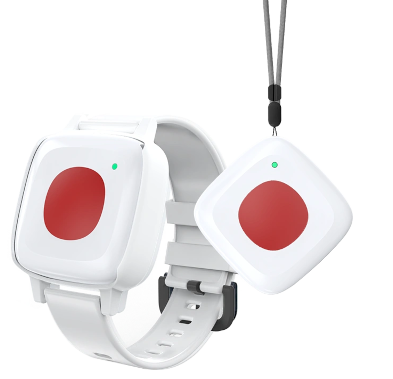
Description
Wearable Panic Button with rechargeable battery. There are Wristband and Pendant options for wearing. Delivered with Meshtech firmware to work seamlessly and integrate fully in a Meshtech system. It has a push button for input and vibrate/LED indication to provide feedback. Expected batterylife between charges will vary with use and configuration, up to 6 months with default settings.
This hardware is sourced from Minew. See Minew MWB02 for hardware details.
The Bluetooth chipset is nRF54L15 from Nordic Semiconductor.
- Firmware Model Number: 0x0062 (98)
- DFU Type: BLE SMP
Normal operation procedure
Similar to all Meshtech trackers the Minew MWB02 0062 is delivered in storage mode. This is to avoid BLE advertising during transport. Normal operation device-mode for this device is unconnected. Pressing button for 1s will make device discoverable by advertising BLE storage mode advertisements, and device can be provisioned by command via system/gateway. If no provision command is received while being in this state, device will go back to sleep and stop advertisements. To simplify provisioning to legacy unconnected mode, pressing button for more than 5 seconds while in storage mode will automatically switch it to unconnected mode, and no command to switch mode is necessary from the system.
Alarm can be manually deactivated by "OSO" button sequence when operating in alarm-mode 1 (default).
Supported Device Modes
- Storage
- Unconnected
Service Mode
Service Mode can be used to perform DFU upgrades and/or factory reset of a device when provisioning information (i.e. network key) is unknown/lost. To enter Service Mode, button need to be held down for 20s+ while charger is connected. Device being in Service Mode is indicated by blue LED blinking rapidly. Device is discoverable by "SM0062-<firmware-version>" device name while in Service Mode. It runs BLE SMP and can be connected to and upgraded. To perform factory reset, press button continuously for more than 5 seconds while device is in Service Mode. LED will light constant while button is held, and should be held until LED turn off (5s) to perform factory reset. If no connection is established or no factory reset command is received, device will reboot and start in previous mode after 2 minute timeout. Timeout is extended while BLE connection is established and for additional 2 minutes after disconnect.
Properties
Note
0x8810 - Motion and 0x9821 - Unread Text Message are not reported in secure mode. 0x9810 - Whitelist Key is not applicable in secure mode.
Events
| Event | Version |
|---|---|
| 0x8113 - Watchdog Reset Event |